
LevelBlue Completes Acquisition of Cybereason.  Learn More

LevelBlue Completes Acquisition of Cybereason.  Learn More

Services
Cyber Advisory
Managed Cloud Security
Data Security
Managed Detection & Response
Email Security
Managed Network Infrastructure Security
Exposure Management
Security Operations Platforms
Incident Readiness & Response
SpiderLabs Threat Intelligence
Solutions
BY TOPIC
Offensive Security
Solutions to maximize your security ROI
Operational Technology
End-to-end OT security
Microsoft Security
Unlock the full power of Microsoft Security
Securing the IoT Landscape
Test, monitor and secure network objects
Why LevelBlue
About Us
Awards and Accolades
LevelBlue SpiderLabs
LevelBlue Security Operations Platforms
Security Colony
Partners
Microsoft Security
Unlock the full power of Microsoft Security
Technology Alliance Partners
Key alliances who align and support our ecosystem of security offerings
Loading...
Loading...

HOWTO: How can I purge the data saved in an evaluation reporter before sending back to Trustwave?

Expand / Collapse


This article applies to:

  • SR
  • WFR 

Question:

  • How can I purge the data saved in an evaluation reporter before sending back to Trustwave?
  • How can I purge the data saved in the reporter and restart from scratch?

Procedure:

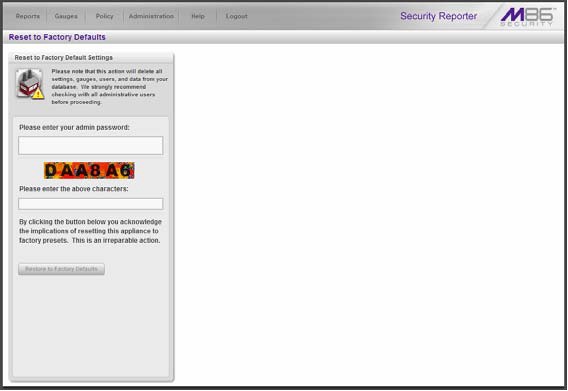
The global administrator uses the Reset to Factory Defaults panel, if necessary, to purge all data saved in the SR.

From the SR navigation toolbar, mouse over the Administration menu link and select Reset to Factory Defaults to display the Reset to Factory Defaults panel.
Type the administrator password and the characters displayed on the screen. Then click Reset to Factory Defaults.
Notes:

This feature deletes all settings made to the SR including administrator, group, and real time gauge configuration settings.

Alerts and all saved data will be purged and cannot be restored.

When executing this function, the current software update level is now retained on the server along with network settings, and if activated, the server returns to evaluation mode.


To contact LevelBlue about this article or to request support:


Rate this Article:
     

Add Your Comments


Comment submission is disabled for anonymous users.
Please send feedback to Trustwave Technical Support or the Webmaster
.