This article applies to:
- Trustwave MailMarshal (SEG)
- Trustwave ECM/MailMarshal Exchange 7.X
Question:
- Why are message digests for spam being delivered to external addresses?
Information:
This problem can occurs when MailMarshal or ECM folders and rules are not correctly configured.
By default, digests are sent to the message recipient (unless you specify "send all digests to a single recipient"). If a folder contains both "inbound" and "outbound" messages (both messages with internal recipients, and messages with external recipients), then some digests could be sent to external addresses.
Curent versions of MailMarshal allow you to configure digests of outgoing mail, sent to the internal sender.
Procedure:
To ensure that message digests are only sent to internal email addresses, ensure that any folders that will be digested for the recipients contain only incoming messages. Rules that quarantine outbound messages should use other folders.
If you want to notify internal senders about blocked outgoing email, use a "notification message" rule action.
Self-Management option:
You can include folders with outbound messages in the folders visible through the Spam Quarantine Management website. For each folder that you want to include, edit the folder properties and choose "Enable end-user management for this folder."
- For rules that apply to incoming messages, always use a folder that has the setting Folder is used to manage messages addressed to a user (or inbound messages).
- For rules that apply to outgoing messages, always use a folder that has the setting Folder is used to manage messages addressed from a user (or outbound messages).
If you want to apply the same criteria to both inbound and outbound messages, use two rules and two folders. 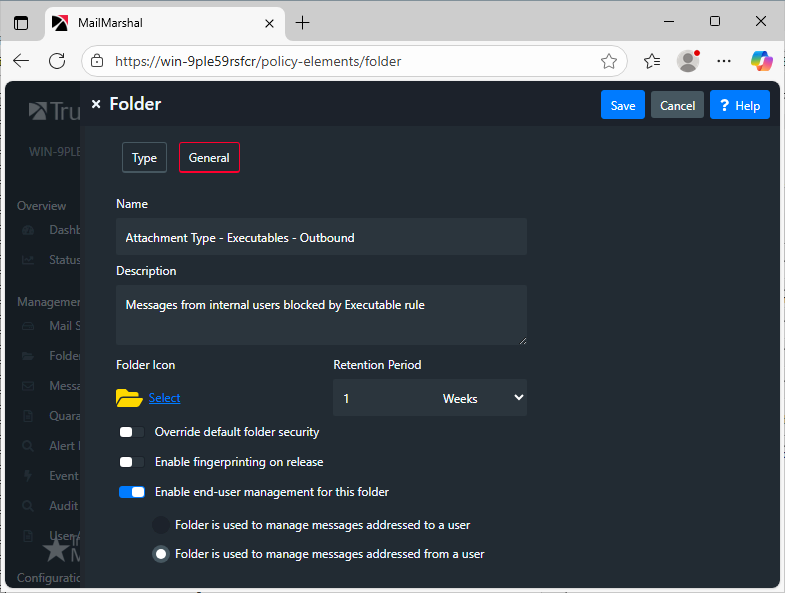
Notes:
- MailMarshal and ECM default rules are correctly configured and do not send message digests to external addresses. To send external digests in current versions of MailMarshal, you must create a new digest that applies to the appropriate folders.
- Current versions of SEG/MailMarshal, and ECM/MailMarshal Exchange 7.X, allow you to select user groups when digesting, which provides additional flexibility.


