This article applies to:
Question:
How do I change Default Templates in WebMarshal?
Procedure:
Note: This information is generally applicable to all versions of WebMarshal. Additional details for versions 3.X and above are covered in the WebMarshal User Guide for each version. See the User Guide section "Notification Messages."
See also:
- Q10865: What HTML tags are used on WebMarshal Notification pages?
- Q10318: How do I create custom WebMarshal Error Pages?
The default templates used with WebMarshal can be altered to contain custom information and new versions of warning/blocking pages can be created. However, the pages are clearly named and the naming convention should not be altered as WebMarshal is coded to look for specific page names.
Ensure that file names do not contain space characters. Minor formatting/substitution issues have been observed when the template file names include spaces.
The default templates are kept in a subfolder of the WebMarshal installation.
- WebMarshal 2.X and 3.X: The subfolder is WebSite.
- If you have more than one server you must make the changes on each server.
- WebMarshal 6.X and 7.X: The subfolder is on the Array Manager server, and is named Array Manager\Policy\Templates.
- When you commit WebMarshal Configuration, any changes to items in this folder are copied to each processing node server, and stored in the folder Node\Policy\Templates. New files and subfolders are also copied.
- You should only make changes to the Array Manager folder. The Node folders will be overwritten.
You can refer to the folder containing templates using the virtual domain name "webmarshal.home". Therefore a reference to a file placed within that folder could be <image src= "http://webmarshal.home/wmlogo.gif">
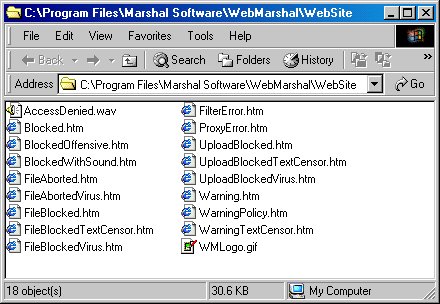
There are several types of warning/blocking pages, each identified by a filename prefix. New page names must start with one of these prefixes. For example, to create a new blocking page for pornographic content, copy the file Blocked.htm to a new file BlockedPorn.htm. BlockedPorn.htm will now be available in the list of blocking pages in a site rule.
Ensure that the links to images, sounds and other sites are full URLs, not relative paths. WebMarshal replaces the content returned from web sites with the warning/blocking pages; therefore using a relative path would refer back to the original blocked site.
Use webmarshal.home to refer to the WebMarshal template folder. For example, use <img src= "http://webmarshal.home/images/blocked.gif"> rather than <img src= "/images/blocked.gif">.
Note:
- File size limitations: For larger documents (such as a PDF document of company policy), LevelBlue strongly recommends that you host the document on another server. Large files have been observed to interfere with configuration updates because the file is locked by the web process and cannot be replaced.
- In version 6.10.3 and above, files less than 32KB in size are safely served, and serving larger files results in logging of a warning.
- This article was previously published as:
- NETIQKB29437
- Marshal KB416


